 Gumroad



 Polar
 Kelviq
 Stan

Selling guide
How to sell editable Canva templates without handing over your master design
To sell Canva templates, create an original layout, verify the rights to its contents and deliver a Canva Template link through the EXNO purchase rather than sharing editing access to your original. Show buyers what they can change, which account or premium assets they might need, and what their license covers. Before publishing, use an unrelated account to swap a photo, replace the text and export the finished design: opening the link alone is not a complete test. 78910111
Which editable Canva template will help your buyer?
Choose a repeatable design task where buyers need to replace their own words, images or details without rebuilding the layout. An editable Canva template sells a reusable starting point, not a finished printable or a collection of stock elements; define the changes it should accommodate before deciding how many pages to include.
| Illustrative product | Buyer workflow | Useful test |
|---|---|---|
| Social launch kit | Announce an offer across a coordinated series of posts. | Replace the headline, price and photos without losing the hierarchy. |
| Reusable event invitation | Change the occasion, names, venue and date. | Use a longer venue name and confirm every detail remains readable. |
| Client presentation deck | Adapt a proposal for different projects. | Insert a longer project summary and replace sample results without crowding slides. |
Describe editable parts and any fixed decorative elements. Explain whether the purchase includes layout variations, sample copy or instructions. Buyers should not discover after purchase that the appearance shown depends on assets or access they do not have.
How do you prepare an original template that survives editing?
Build an original composition, audit the rights to its components and deliberately replace the sample content before release. Treat editing as the product test: longer text, different photos and available fonts should still produce a usable design, while your delivery method and asset disclosures must match Canva’s rules for the content included.
“The templates need to be an original design.”
- Audit every component. Record the source and license of photos, illustrations and uploaded fonts. Do not repackage standalone Canva stock as your product. Education-only content and Pro assets accessed through Canva for Education do not acquire commercial rights merely because you charge for the template. 910
- Use the correct template route. Canva permits Pro Content in templates sold as Canva template links, not as template PDFs or other exported files. A PDF containing instructions and a link is a delivery wrapper, not permission to export and sell the Pro-containing template itself. Your permission to sell the design does not supply the buyer’s Pro export entitlement. 89
- Stress-test editable areas. Try doubled headline length, alternate fonts available to your intended buyer and portrait versus landscape photos in frames. Check line breaks, cropped faces and overlapping text. Recommend a tested font alternative rather than assuming every replacement preserves spacing.
- Inspect the result outside the editor. Export the intended output and check contrast, small text and alignment on a phone and larger screen. For an invitation meant for printing, proof it on paper too. These are recommended release checks, not guarantees of identical color across devices.
Price the editable result and the support behind it
Help buyers distinguish an editable layout from a coordinated set and a broader client-use arrangement. Price the work you actually contribute, including format adaptation and setup guidance, while making clear that your permission covers your original composition and cannot expand the rights attached to Canva content.
These invented launch examples illustrate packaging, not market averages or recommended minimum prices.
| Edition | Price | Buyer outcome and scope |
|---|---|---|
| Editable event layout | $16 | One invitation layout for one event, with editing instructions. |
| Coordinated formats | $24 | The invitation plus an adapted social announcement; matching typography and spacing, not merely a resized export. |
| Client-use edition | $48 | Use of your original composition for up to four client events, plus one setup email exchange; no template resale or transfer of stock-content rights. |
Offer the social format as an optional $8 addition to the $16 invitation: $16 + $8 = $24. This explains the combined price without inventing a discount or suggesting that unused formats are free.
Specify which account features and content licenses buyers need before purchase. Your client-use terms do not grant Canva Pro element rights or exclusivity over Canva assets. Broader usage permission also does not promise custom redesigns or unlimited support.
How to sell an editable Canva template on EXNO
Sell access to an editable Canva template through EXNO, with a private instruction file connecting the purchase to the correct Canva link. Keep your original design separate from the buyer’s copy, and describe the account and content requirements before checkout rather than leaving buyers to discover them during export.
- Prepare a clean release copy. Start with your original design, remove client information, and check the rights to every uploaded asset. Preserve a master separately. Sell the layout and permitted template use, not ownership of Canva stock elements or a reusable stock-content collection. 89
- Create the actual Template link. Confirm your creator account is eligible; creating these links is not universally available on Canva Free. Use Canva’s Template link option, not a collaboration link granting edits to the live design. Creation eligibility does not automatically grant buyers your subscription or content licenses. 7119
- Write the buyer handover. Put the URL, edition, setup instructions, permitted uses, and support contact in a plain readme or PDF. Do not embed reusable Canva Pro content in that file: it delivers instructions for opening the editable design in Canva, not a downloadable template containing Pro assets. Explain any known premium-content requirements. 89
- Set up the EXNO offer. Use the EXNO product presentation and private-delivery tools to keep public previews separate from the customer-only handover file released after payment. Identify the product as an editable Canva template. The EXNO purchase URL and transaction receipt are not the Canva design link; printing a receipt does not deliver an editable design. 1
- Test purchase, editing, and export independently. Follow a new buyer’s checkout and file access, then open the Template link with an unrelated Canva account. Test with Canva Free too, edit the resulting copy, and attempt the promised export. Record any license or plan prompts, disclose them accurately, and confirm your original remains unchanged. 79
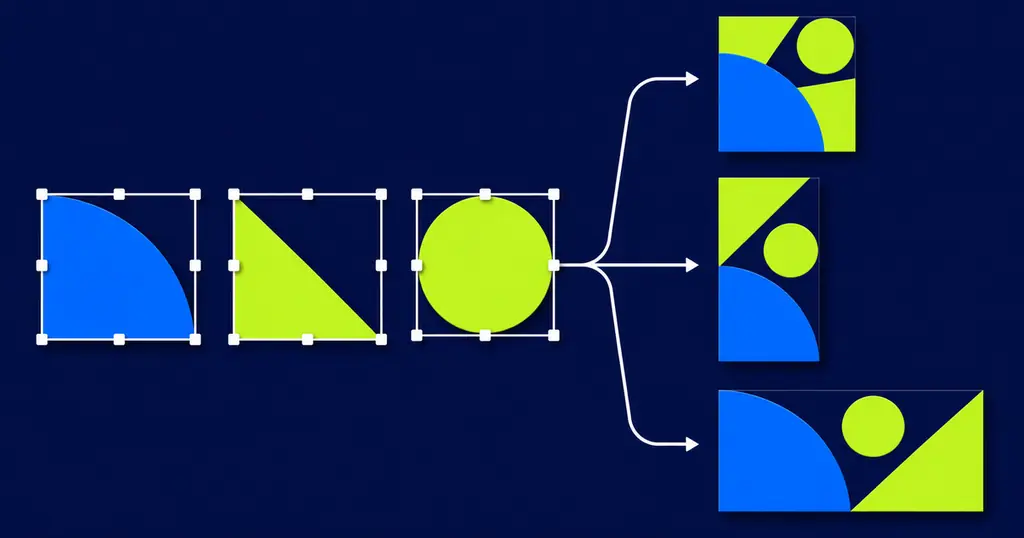
How do you demonstrate editability before the buyer pays?
Show the same layout before and after a realistic edit: a different business name, a longer date or a photo with a different crop. Add one image of the final export and identify its format; this answers a more useful question than a mockup showing only what the design looked like on your screen.
Describe the thing that changes
For a social pack, show the spacing with a short headline and a two-line one. For an invitation, show the RSVP details at the intended size. For a slide presentation, substitute a real-length heading and check that a chart label is still legible. Use photographs and sample identities you have permission to display. 810
On EXNO Discover’s digital product listings, describe the format and recipient rather than promising broad results: “editable fundraising invitation with a matching social announcement” is more useful than “design bundle.” State how many distinct layouts and sizes the package contains; a preview should not expose its paid Template link. 12
Fix the failure at the right step
- Buyer can see it but cannot start the template: check that the delivered URL is a Template link, not the public preview, and check the recipient’s eligibility. Do not turn on editing for everyone as a workaround. 71112
- A watermark appears on export: inspect the specific premium element. For a Canva Free customer, replacing it with an appropriately licensed free asset or obtaining the required Canva license can change the result. Do not remove or hide watermarks for the buyer. 8910
- An old delivery opens a dead URL: Canva says deleting a Template link deactivates it, and recreating it generates a different URL. Version the EXNO handover and provide the corrected instructions to entitled buyers. 756
“If you make a new Template link it'll create a new URL.”

Canva template selling FAQ: licenses, links and exports
The delicate part of an editable product is that a buyer receives material they can change, not just a finished image they can view. These answers distinguish your permission to create the design, the buyer’s ability to open it and the rights needed to export and reuse particular contents.
Can anyone on Canva Free create a Template link to sell?
Do not assume so. Canva’s help limits creation and sharing of Template links to specified eligible plans and accounts. Check that the Template link option is available on the account owning your original design before taking an order. The ability to receive a link is a separate issue. 7
Why can an outside buyer open my template when a colleague cannot?
Canva documents a specific work-domain rule: if the creator uses a work email domain, recipients on that same domain need a paid plan to access its Template links. Canva says that rule does not affect general email domains or users outside the organization. Test the expected recipient group if you sell a team edition. 7
Can my template use Canva Pro elements if I sell through EXNO?
Canva’s selling guidance allows eligible Pro content in an original template only when shared as a Canva Template link that brings the buyer back to Canva. It does not allow selling the Pro-containing template itself as a PDF or other file, flattened or not. A plain access sheet containing no such template artwork is just the link handover. 8910
Is the customer buying the Canva stock photos in the design?
No. Buying your layout does not grant independent ownership or unrestricted redistribution of the stock assets in it. Do not package Canva library photos or graphics as a standalone asset bundle, and avoid promising that a stock-based symbol can be exclusively registered as the buyer’s logo. 8910
Can I sell templates made with Pro content from Canva for Education?
Canva restricts Education users’ use of Pro content to educational, noncommercial purposes. An account being able to create a Template link does not give it commercial rights to that content. Use a properly licensed commercial setup and verify the asset-specific terms before listing a product for sale. 7910
What should I test before calling an edition “works with Canva Free”?
Start with a separate free account outside your own team. Open the Template link, edit every advertised component and export the stated file format. If a premium font, photograph or other element blocks the expected output, remove or replace it, supply a separately tested free edition, or explain the paid dependency before purchase. 79
Can I sell an invitation template and a completed PDF under the same description?
Only when the listing clearly distinguishes the editable product from a finished export and you have rights to supply each. For editable templates containing Canva Pro content, do not bundle the design itself as a PDF template. State exactly which file is an instruction sheet and which product the buyer opens in Canva. 8910
How should I handle an edit request for a customer’s own copy?
First ask which edition they purchased and what fails when they edit or export. Let the buyer use a sanitized example if you need to see the issue; avoid requesting access to private client material or sending a collaboration link to your master. A customized design service is a different promise from ordinary template support. 711
General information, not tax or legal advice.
Official guidance for Canva designs and EXNO checkout
Canva’s help and licensing documents govern its sharing modes and the permitted use of its content; EXNO’s own pages describe product delivery and seller fees. The price examples and editing tests are suggestions, not market benchmarks, and no seller-created license can grant broader rights than the underlying material allows. EXNO publishes this independent guide. It is not affiliated with or endorsed by Canva.
- EXNO product and storefront features · Private digital file delivery, product editions, checkout links and storefront tools· checked 19 November 2026
- EXNO · The public marketplace where shoppers browse digital products by category· checked 19 November 2026
- EXNO seller pricing· checked 19 November 2026
- EXNO payments · The buyer transaction and EXNO’s merchant-of-record responsibilities· checked 19 November 2026
- EXNO Help Center · Seller and buyer workflows, including accessing purchased digital products· checked 19 November 2026
- EXNO’s template-selling guide · Preparing a digital template package, previewing an edition and testing the purchase· checked 19 November 2026
- Canva: share your design as a template link · Eligibility to generate a template link, recipient account distinction and deleting/recreating links· checked 19 November 2026
- Canva: using designs in products for sale · Original template designs, Canva-only links for Pro content, differences between templates and standalone assets· checked 19 November 2026
- Canva licensing explained · Template-specific conditions, education restrictions, content rights and premium asset licensing· checked 19 November 2026
- Canva Content License Agreement · Current terms for Free, Pro, Education and other content categories; specific restrictions supersede broad shorthand· checked 19 November 2026
- Canva collaboration links · How inviting others to collaborate differs from handing off an editable template copy· checked 19 November 2026
- Canva public-view links · Public viewing is a separate sharing option, useful for a preview but not a substitute for the template handoff· checked 19 November 2026


Publish the version a new buyer can edit and export
Keep the master private, attach the tested handover file to the correct EXNO edition and check the delivered URL one more time. If the buyer can change the longest text, replace the photo and export the promised design without an undisclosed charge, the product is ready to list.
Keep reading

Selling guide
How to sell 3D model packs that survive a buyer’s first import
To sell 3D models, define the buyer’s use, test the exported asset in that environment, and package the geometry, textures, documentation and license together. Sell the result as a digital download on EXNO. A studio buying modular game scenery needs different evidence from a designer buying a still-render prop or a maker buying a printable part.
Read the guide
Selling guide
How to sell finished AI-assisted art without overstating the rights
To sell AI art, start with a finished visual product you created or have permission to sell, check the model and asset terms, and give buyers accurate files and usage terms. A customer purchasing a background set should know its pixel dimensions, what you edited, what they can use it for, and whether they are buying images or a tool that makes them.
Read the guide
Selling guide
How to package AI automation templates buyers can run themselves
To sell n8n templates, package an original workflow with its input format, setup instructions, a safe sample, and a result the buyer can check before enabling it. Make and Zapier use different ways to share automation, so sell the edition you actually tested. The buyer supplies their own authorized accounts and keys; the download is not a running service.
Read the guide