 Gumroad



 Polar
 Kelviq
 Stan

Guide
Is your digital product ready to launch? A checklist you can run
A digital product launch checklist should end in a decision: publish when a buyer can understand the offer, complete checkout, receive the right item, and use it as promised. Rehearse that path before announcing, keep a person available for the first orders, and reserve a date to review what happened. A launch can be small; a broken delivery should stop it.
What must be settled before you announce a date?
Lock the release you intend to sell, the people it is for, the price they will see, and the work you are promising after payment. Put these decisions on one release sheet so the description, preview, checkout, and delivery all refer to the same edition rather than yesterday’s draft.
- Name one outcome and one limit. A budgeting spreadsheet might help a freelancer estimate project costs without doing their tax filing. A video course might teach a mixing technique without including feedback on a student’s track. Put the important limit where a buyer makes the decision.
- Freeze one copy. Keep a dated copy of the files, a list of what is included, and the version shown in your preview. Open the package from a fresh folder. If a demonstration uses extras that buyers do not receive, label them or replace the demonstration.
- Set the price, scope, and capacity. Note the currency, whether the offer is one-time or recurring, and what updates or human support you include. For a limited service, ten orders that require 45 minutes each mean 450 minutes, or 7.5 hours, before preparation and follow-up. Do not announce more delivery capacity than you have.
- Choose a place and a person. Write down where the announcement will appear, where its link goes, who will check the first order, and when they can respond. If you work alone, release during a period when you can actually investigate a problem, not just when you can schedule a post.
The release sheet can be four lines: Buyer and result; price and edition; exact file or access delivered; contact and support window. If two people working from those lines would send different products, settle the difference first. For help describing the offer itself, see the digital product description guide.
How do you rehearse the buyer’s first ten minutes?
Give someone who resembles the intended buyer the exact listing and a realistic task, then watch without telling them where to click. Test both the purchase route and the first useful action after delivery; a successful payment cannot tell you whether the delivered product opens, fits, or makes sense.1
- Start at the announcement. Open the final link on a phone while signed out of the seller account. Ask the tester what they believe they will receive, what it costs, and whether they need another tool. Compare that answer with your release sheet rather than explaining away a mismatch.
- Check checkout with eyes and keyboard. Select the intended edition and compare the displayed total to the description. Use Tab and Shift+Tab to check that you can reach the controls and see which one is active. Check that a missing required field produces an understandable correction, not just a red border. These are preliminary checks, not an accessibility audit.23
- Verify an actual handoff. Arrange an authorized end-to-end purchase when appropriate and account for any real charges; do not assume a preview proves delivery. Check the confirmation, receipt, purchased edition, and destination in the EXNO buyer library when applicable. Use a buyer account rather than relying on the editor’s access.
- Finish a task, not just a download. Import a sound into a new project, type into a copy of a template, or start the first exercise in a course. For a service, verify that the buyer knows how to submit a brief and when to expect a reply. Close everything and see whether the buyer can find their way back.
EXNO’s email template editor lets you preview the receipt and delivery emails before sending. In a receipt, check that the item name matches the listing; in a delivery email, put the action before any brand story. A good preview and a working buyer journey answer two different questions.
Which findings should hold up the launch?
Stop the announcement for a defect that can charge the wrong amount, deliver the wrong thing, prevent normal use, or sell work you cannot fulfill. Keep cosmetic improvements on a separate list so a slightly awkward image crop does not receive the same attention as a missing paid file.
| What the rehearsal found | Decision | Evidence needed next |
|---|---|---|
| The personal-edition listing opens checkout for a different, more expensive team offer. | Hold the announcement. | Follow the original link again and verify edition, price, and final total. |
| The sold archive opens, but its files refer to a missing asset. | Replace the package and retest. | Complete a real task on a device without your source files. |
| The promised mentoring slots exceed the time you have available. | Reduce the offer or postpone sales. | Match the promised delivery window to actual open time. |
| The preview crop is untidy, but the content, terms, and purchase path are accurate. | Record it for a later edit. | Name who will fix it and check the image after replacement. |
If a failure appears after launch, contain it first. Pause announcements that send more people into the problem. Identify the affected edition and orders, explain the concrete next step to affected buyers, and involve EXNO for transaction issues. Test the correction from the original link before resuming promotion; keep a note of which buyers still need help.

What should you do on launch day and in the first week?
On launch day, share the verified route with the audience you prepared for and confirm that an order arrives as expected. During the first week, review what people saw, where they stopped, and what early buyers needed; use that evidence to choose one improvement instead of changing the whole offer at once.
- At release: use a single primary destination in each announcement. Show the product in use and make the price and prerequisites findable. If you offer an introductory discount, set its end date and usage limit in EXNO, then check the resulting amount and the wording buyers see.
- After the first orders: check the actual items sold, delivery questions, and issues by edition. Separate questions about the product from questions about payment. If a sample confused buyers, fix that sample as well as the listing; it may be the only part they saw before checkout.
- At the first review: EXNO statistics show per-product views, checkout opens, sales, and earnings. Write down the period and counting rule before comparing stages. Keep your internal tests separate when reconciling figures; if you cannot separate them reliably, say so rather than presenting an exact buyer rate.4
Example: assume 200 genuine product visits, 40 checkout starts, and eight completed orders in one window, with one count per person at each stage and all 40 starts and eight orders coming from those same 200 visitors. That is 20% from visit to checkout, 20% from checkout to order, and 4% from visit to order. If few people arrive, work on reach; if people pay but cannot open the file, fix delivery regardless of those rates. These are illustrative counts, not launch targets.
EXNO is the merchant of record and handles applicable buyer transaction taxes, refunds and disputes; you remain responsible for what the listing promises and for correcting faulty content. Standard sales: 7%. Discover sales: 7%. Additional fees may apply to payment processing, payouts and other transactions. See the Seller Agreement for current fees and terms. Use the EXNO refund policy when a buyer asks about a transaction.
A release-day mark that does not need a countdown
A launch date can be worth recording even when the first edition is modest, like a single workbook or a short course you finally tested all the way through. A permanent rectangle on the EXNO Pixel Wall gives that release a title, a color or an image, and an optional link.
If you want to mark the occasion and support EXNO, select your space on the EXNO Pixel Wall for $1 per pixel. Approval comes before display, and EXNO refunds the whole amount if the submission is declined.

Digital product launch questions before and after release
A launch plan is useful even without a large audience or a long campaign, because it creates a short list of things somebody has actually checked. The questions below separate the work needed to accept an order responsibly from optional promotion and the longer work of improving an offer.
Do I need a waiting list or a paid campaign to launch?
No. A small release to people who already understand the problem can test whether the offer and delivery work. A waiting list measures expressed interest, not completed purchases or a promise of revenue.
Is a test download enough if the checkout preview looks right?
No. A download from your own dashboard does not show whether a buyer gets the right edition, receipt, access permissions, or next instruction. Test the buying side separately before treating the whole route as ready.
Should I launch several products together?
Only if each one can pass the rehearsal and someone can support the combined workload. If a bundle contains a workbook, video, and editable files, check every component as delivered in the bundle rather than assuming the separate listings prove it works.
What if launch week ends with no orders?
First establish whether likely buyers reached the correct page and whether the buying path worked. Little exposure, the wrong audience, unclear terms, and a price objection call for different responses; the absence of orders alone does not tell you which is responsible.
What should I keep from the launch for next time?
Save the release sheet, the buyer-facing copy and package, notes from the first-use test, and the decisions you made about unresolved issues. Keep one short list of lessons connected to evidence, such as the exact step that stopped two testers.
General information, not tax or legal advice.
Sources
The testing references describe how to observe a realistic task and check basic keyboard access, errors, and confirmations. The measurement reference explains why a completion rate needs a defined start and finish; its method informs the example above without setting a target for any commercial launch.
- Government Digital Service: using task-based, moderated usability testing· checked 20 November 2026
- W3C Web Accessibility Initiative: first checks for keyboard access and visible focus· checked 20 November 2026
- W3C Web Accessibility Initiative: useful form errors and success confirmations· checked 20 November 2026
- Government Digital Service: defined starts, completions, and the completion-rate denominator· checked 20 November 2026


Take one release from rehearsal to a checked first order
Pick the exact edition you are ready to stand behind and ask one person to try the task your listing promises. When the package, checkout, and first use agree, set up your release and choose who will be available to look after those first buyers.
Keep reading
Guide
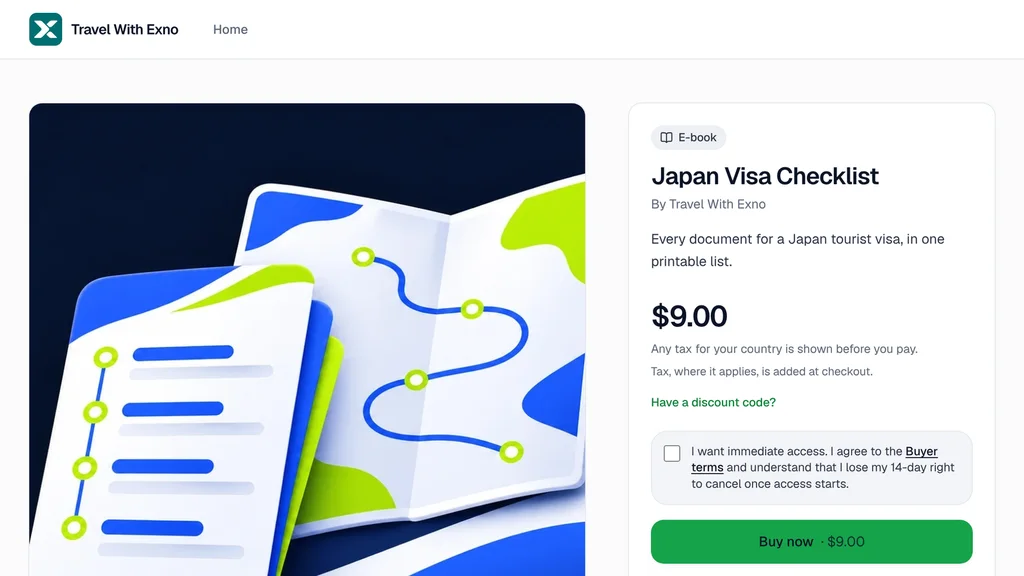
How to add a product to your EXNO store
Adding a product takes a few minutes: you create it, write the page buyers see, set a price, add a cover and the files buyers get, and publish. The clips below show every step in a real EXNO store, Travel With Exno, as it adds a Japan visa checklist.
Read the guide
Guide
Where should you sell your digital products?
The best platform to sell digital products depends on what you deliver, how buyers find it, and who should handle the transaction. Shortlist Etsy for original digital designs, Shopify for a shop that also ships goods, Gumroad for direct creator sales, and EXNO for a mixed digital catalog with a storefront and marketplace.
Read the guide
Guide
What to do when a buyer disputes a digital product sale
Chargebacks on digital products happen when a buyer disputes a card payment through their card issuer rather than simply requesting a refund. On EXNO, submit the evidence for each case through the Disputes page; EXNO adds the order records and handles the response, while the disputed sale’s earnings wait for a decision.
Read the guide